
Make Free: is 1,000 credits enough for your first workflow?
Estimate polling checks and per-record actions before choosing Make Free. See when a slower schedule, an instant trigger or a paid plan may fit.
Official information checked on October 3, 2026. The monthly workload below remains a planning estimate. On the same date, we tested the small manual Tools → Tools → HTTP demo described here; we have not tested the business handoff.
One hundred new rows a month sounds small. In Make, the schedule used to look for those rows can matter as much as the rows themselves.
Free may be enough for a small internal handoff that can wait. Before relying on it, count both the checks for new data and the actions performed when data arrives.
What Make Free includes
| Item | Published Free-plan limit |
|---|---|
| Platform subscription | US$0 |
| Usage allowance | 1,000 credits per month |
| Active scenarios | 2 |
| Minimum interval for scheduled runs | 15 minutes |
A scenario is Make’s term for a workflow. The scheduled interval applies to scheduled execution; instant triggers have different behavior. These limits were checked against the official Make pricing page.
For this article, we use a simple job: look for new records, copy each one into a working table, and send an internal notification. The actual apps and modules still need to support the job you want.
Count the checks, then the records
Operations describe module runs; credits are the billing unit. Check the rate of each module you select. Many standard actions use one credit per operation, while some fixed-rate modules cost more and some AI features have variable usage. See Make’s credits guide.
Make Academy gives a direct example with Gmail → Watch Emails: a check uses one operation and one credit whether it returns zero or 50 emails. When it returns five emails and Google Sheets → Add a Row writes one row for each, the example totals six credits: one for the check and five for the rows. This is an official example, rather than our own test. See the Academy lesson.
We have not tested Google Sheets → Watch New Rows. For the estimate below, we explicitly assume that the selected polling trigger costs one credit per check, including empty checks, and that each record reaches two actions costing one credit each. Verify those rates for the modules in your own workflow.
What we measured: one manual three-module run
The researcher’s setup record describes this test: On October 3, 2026, we manually ran a small anonymous scenario in an existing Make Free account: two Tools “Set variable” modules, then HTTP v4 “Make a request”. The variables were lwl_start and lwl_demo, both set to anonymous-demo. They were not sent to the HTTP endpoint. The request was an unauthenticated GET to https://example.com/, with no custom headers, query or body, no pagination, and Parse response set to No.
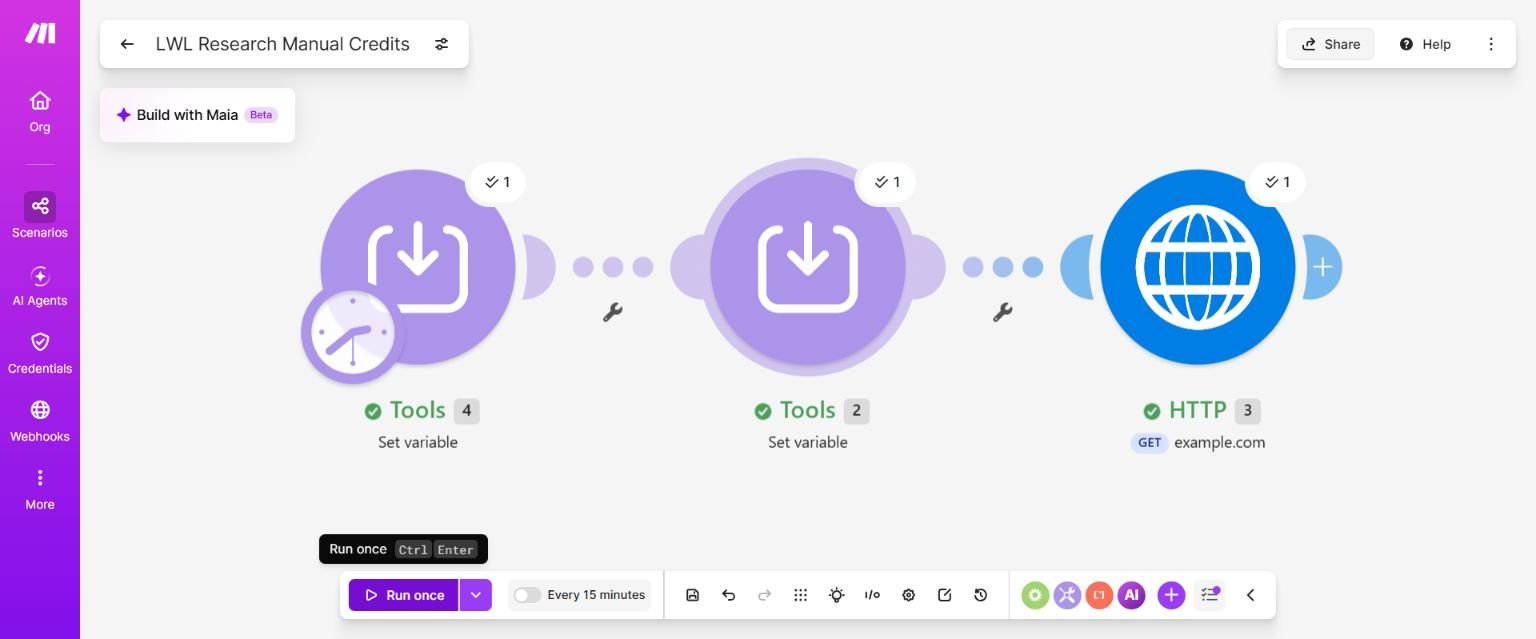
The research log records the attempts: There were two manual attempts. At 14:33:47 Taiwan time, History showed Success but 0 operations, 0 credits and 0 B: an empty starting placeholder meant no module executed. We corrected that starting point. At 14:38:03, one actual end-to-end run showed Success, 3 operations, 3 credits and 1,004 B. Tools #2 returned the anonymous value; HTTP returned status 200 and Example Domain.
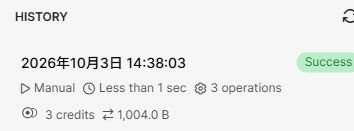
The researcher’s account-page observations record that remaining free credits went from 1,000 to 997. Scheduling stayed off, and the saved scenario was confirmed Inactive after reopening, with 0 of 2 active scenarios. We made no upgrade or new payment. The credits are observed usage, not money spent. The numbers 4, 2 and 3 on the diagram identify modules; they are not run counts.
This verifies only that one three-module manual run. It does not prove every Tools action always costs one credit, or test Google Forms empty polling, Google Sheets or Slack connections, 100 form submissions, production reliability or any revenue. The monthly table below remains an estimate. Example Domain is an illustrative domain, not a service to depend on for testing or monitoring; this was one illustrative GET.
A 30-day estimate for 100 new records
Here are the assumptions:
- One polling trigger checks continuously over a 30-day period.
- Exactly 100 new records arrive.
- Each record reaches two ordinary actions, each billed at one credit.
- There are no additional searches, repeated actions, AI steps or test runs.
- Every planned check could run. This calculates demand before any suspension caused by reaching the allowance.
The calculation is:
Planned credits = polling checks + new records × two action credits
| Polling schedule | Planned checks | Actions for 100 records | Planned total |
|---|---|---|---|
| Every 15 minutes | 2,880 | 200 | 3,080 credits |
| Every hour | 720 | 200 | 920 credits |
| Every two hours | 360 | 200 | 560 credits |
These are calculations using the stated assumptions. They are not measured account usage.
The hourly version leaves only 80 credits before additional activity. Manual testing, repeated actions or another workflow could use that margin. The two-hour version leaves more room, but it is only useful if your work can tolerate that checking schedule.
The 15-minute version exceeds the allowance even before processing the new records. Make states that scenarios stop continuing when credits run out; the table does not mean a Free account can complete all 3,080 credits of planned work. See the pricing FAQ.
Check whether you need polling at all
Polling repeatedly asks an app whether something has changed. A webhook lets an app send data when an event happens.
Make documents webhooks as usually triggering execution when a request arrives. It also allows webhook processing to be scheduled, so you need to check the actual configuration. See Make’s webhook guide.
If your source app has a suitable instant trigger, it may remove the need for periodic checks. Event processing still uses credits. The source app, selected module and configuration determine whether this is available; it also needs to fit the result you want.
A webhook does not establish a guaranteed delivery time for your whole workflow. External services, queued requests and errors still need attention.
When staying free makes sense
Free is a reasonable candidate when the required apps work together, the checking schedule fits the job, and your estimate leaves room for testing and recovery.
Before enabling the workflow, prepare three clearly identified sample records. Check whether each reaches the destination once, whether the notification contains the right information, and how much usage appears in the execution history. Include a check with no new data so you can confirm the trigger’s behavior in your own setup.
Keep a manual way to complete the business handoff while you evaluate it. Its usage, delay, duplicate handling and recovery remain unmeasured; the manual demo above does not validate that workflow.
When to look at paid plans
Compare paid options when your required schedule, active workflow count or estimated usage exceeds the limits above. First identify which limit you need to change; that tells you what to compare.
For a usage shortfall, check the current quote at the credit tier and billing cycle you need. Make’s extra-credit documentation restricts extra-credit purchases to paid plans and lists a 25% surcharge over the plan’s credit rate. Adding credits does not change other plan limits. See Make’s extra-credit rules.
Annual billing also changes the commitment. Make states that the yearly amount is paid upfront. Core still receives monthly credit allocations under annual billing, while Pro and Teams have annual packages. Check the relevant allocation and expiry rules before choosing the payment cycle. See monthly and annual subscriptions.
We have not verified country-specific checkout, taxes, accepted payment methods or the renewal quote for a particular account.
If your required schedule or usage exceeds Free’s limits, review Make’s payment terms and affiliate disclosure.
Choose your next step
Write down three things: how quickly the job must respond, how often it will check for data, and what happens to each new record. Use those figures to estimate usage, then confirm them with a small run in your own account.
Review Make’s current plans and limits.
If you are still choosing the platform, read Make vs Zapier for the same workflow. To include setup and maintenance in the decision, use our automation-cost worksheet.
The provider links in this article lead to official pricing and documentation. This article uses no affiliate tracking link.